

Manage sources and their links
Link an existing source to an integration mapping or a company branch, and check the result. You need access to Source management in the One Platform Developer portal and a source registered during company onboarding.
Open Source management
Register a new source when you onboard a company. Source management works with sources that are already registered.
- Sign in to One Platform and switch to the Developer portal.
- Check the workspace at the top of the sidebar. The Developer portal uses the country and environment you last chose in the Invoice Portal; to change them, see Switch country, environment and portal.
- Select Source management.
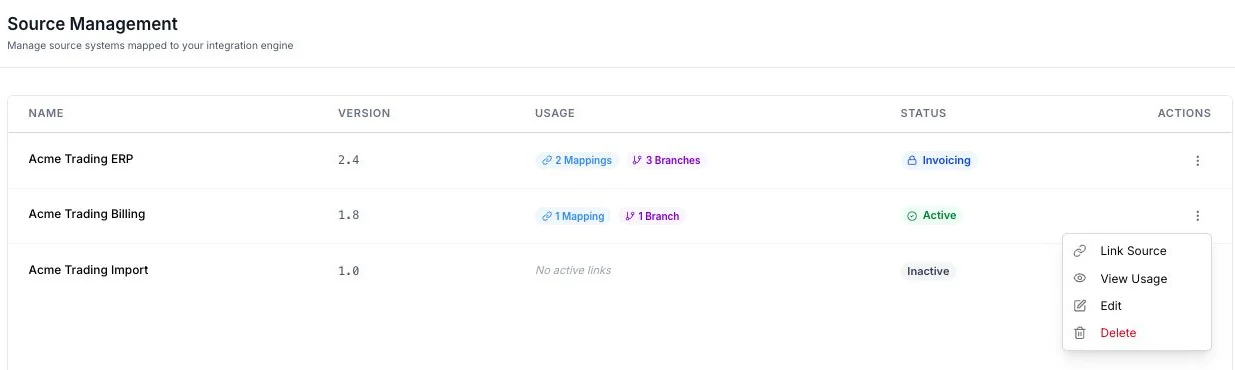
You should see a list with each source’s Name, Version, Usage and Status. Select a source name or View Usage from its Actions menu to see its linked integration mappings and branches.
Link a source to an integration mapping
Before you start, have an integration mapping for the country and document type you want to send.
- Find the source in Source management.
- Open its Actions menu and select Link Source.
- Keep Integration Mapping selected and choose the integration from the list.
- Select Confirm Link.
You should see a success message. Open View Usage for that source to confirm the mapping appears under Integration Mappings.
If the page reports that the source is already linked to another mapping for the same country and document type, read the mapping names and document types shown in the error. Review those links before choosing a different mapping or source.
Link a source to a company branch
Link a source to a branch when that branch’s invoices come from the source. The branch must already exist; add it from Onboard in the Invoice Portal.
- Find the source in Source management.
- Open its Actions menu and select Link Source.
- Select the Onboarding Workflow tab.
- Under Company Name, choose the company. Under Branch Name, choose the branch, or choose Select Branch under the company to link the source to the company itself.
- Select Confirm Link.
You should see Source linked successfully. Open View Usage to confirm the branch appears under Linked Branches.
To remove a link, open the mapping or branch the source is linked to and choose Unlink on the source.
Change source details
Open the source’s Actions menu and select Edit. Change Source Name or Source Version, then select Save Changes. A success message confirms the update.
If the edit dialog says the source was used in invoicing, its name and version cannot be changed. To remove an unused source, select Delete from its Actions menu and review the confirmation. Deletion is permanent. A source linked to a mapping or branch, or used in invoicing, may be blocked from deletion; check View Usage before trying to remove it.
If something goes wrong
- The source is not listed. Check the workspace, country and environment. If it has not been registered, add it during company onboarding.
- The integration or company is not available in Link Source. Check that it exists in the selected workspace and country. The list does not offer a destination already linked to that source.
Next, view sources in the Invoice Portal to check where each one is used.